Spam means unwanted, irrelevant, or unsolicited messages that are often sent to many people at once. You may see spam in your email inbox, text messages, social media, WhatsApp groups, or even as phone calls.
If you have received a message from an unknown sender, a suspicious link, a repeated advertisement, or a strange offer you never requested, you may have wondered: Is this spam? Why did I receive it? Is it dangerous?
You may also have seen labels such as “Spam,” “Potential Spam,” or “Spam Risk” on your phone or email account and wondered what they actually mean.
If that is what brought you here, you are in the right place. This guide will help you understand what spam means, how to tell whether a message is really spam, how spam differs from phishing and scams, and what you should do when you receive it. We will work through each problem step by step so you can recognize suspicious messages instead of simply guessing.
What Does Spam Mean, and How Can You Tell It From a Normal Message?
The easiest way to understand spam is to think about a message you never asked to receive.
A message can become spam when it is unwanted, unsolicited, repetitive, or sent broadly to many people. The exact context matters, though, because not every message you dislike is automatically spam.
What does spam mean in simple words?
In simple words, spam is unwanted communication sent to you without a reasonable request or expectation that you wanted it.
For example:
- You receive 20 promotional emails you never signed up for.
- A stranger repeatedly sends you advertisements.
- A company sends bulk messages to people who did not request them.
- A phone number repeatedly calls you with an automated sales message.
- A social media account floods a post with unrelated promotional comments.
These are common examples of spam.
Spam is usually associated with electronic communication, although the basic idea is broader: someone is sending unwanted messages or content, often repeatedly or in bulk.
What makes a message spam instead of normal communication?
Look at three things:
1. Did you ask for it?
If you never requested the message, it may be spam.
2. Is it being sent in bulk or repeatedly?
Mass messages and repeated unwanted contact are strong spam signals.
3. Is the sender trying to push something you did not ask for?
Unwanted advertising, promotions, or repetitive content are common examples.
For example, if you subscribe to a store’s newsletter and receive its weekly offers, that is not automatically spam. You gave the company permission to contact you.
But if another company gets your address and starts sending advertisements you never requested, that is much closer to the usual meaning of spam.
What does “stop spamming me” mean?
When someone says “stop spamming me,” they usually mean:
“Stop sending me unwanted or repeated messages.”
It does not necessarily mean the messages are dangerous.
Someone might say it when a person sends too many texts, repeats the same message, posts promotional content repeatedly, or floods a group chat.
For example:
Person A: “Hey, check this out!”
Person A: “Did you see it?”
Person A: “Hello?”
Person A: “Please respond!”
Person B: “Stop spamming me.”
Here, “spamming” means repeatedly sending messages that the other person does not want.
Is every unwanted message actually spam?
Not necessarily.
A single unwanted message can feel like spam, but the term is most strongly associated with unsolicited, repetitive, or bulk communication.
For example, if someone accidentally sends you a message meant for another person, that is unwanted but not necessarily spam.
On the other hand, if an unknown account sends the same advertisement to thousands of people, that clearly fits the usual meaning of spam.
The important question is not simply “Did I dislike this message?” Instead, ask:
Was it unsolicited, repetitive, mass-sent, or clearly unwanted?
How Can You Tell If a Message Is Spam?
If you’re looking at a message right now and wondering whether it is spam, don’t focus only on the sender’s name. Look at the whole message.
A message that appears professional can still be unwanted or fraudulent.
What are the most common signs of spam?
Watch for these warning signs:
1. You don’t recognize the sender.
An unfamiliar email address, phone number, or social media account deserves extra attention.
2. You never requested the message.
If you did not sign up, subscribe, contact the sender, or ask for information, be cautious.
3. The message creates unusual urgency.
Words such as “Act now,” “Your account will be closed,” or “You have only 10 minutes” can be warning signs.
4. It promises something that sounds too good to be true.
Unexpected prizes, free money, huge discounts, or guaranteed rewards should make you stop and check.
5. It contains a suspicious link or attachment.
Do not click simply because the message looks official.
6. The same message keeps appearing.
Repeated promotional or automated messages are a common form of spam.
7. It asks for sensitive information.
Requests for passwords, verification codes, banking information, or other personal details deserve serious caution.
Is it spam if the message looks like it came from a real company?
It can be.
A message can use the logo, colors, language, or name of a real company and still be unwanted—or even fraudulent.
This is why appearance alone is not proof that a message is legitimate.
Instead of clicking the message’s link, independently open the company’s official website or app and check your account there.
For example, suppose you receive:
“Your account has been suspended. Click here immediately to restore it.”
Don’t panic and don’t click the link.
Open the company’s official app yourself and check whether there is actually a problem.
This simple habit can protect you from many deceptive messages.
Quick checklist: How can you tell if a message is spam?
Ask yourself:
- Did I request this message?
- Do I know the sender?
- Was I expecting it?
- Is it repetitive or mass-promotional?
- Does it pressure me to act immediately?
- Does it contain a suspicious link or attachment?
- Does it ask for sensitive information?
- Does the offer seem unrealistic?
- Can I verify the claim independently?
If several answers raise concerns, do not interact with the message until you verify it.
What Does Spam Mean in Email, Texts, Social Media, and Calls?
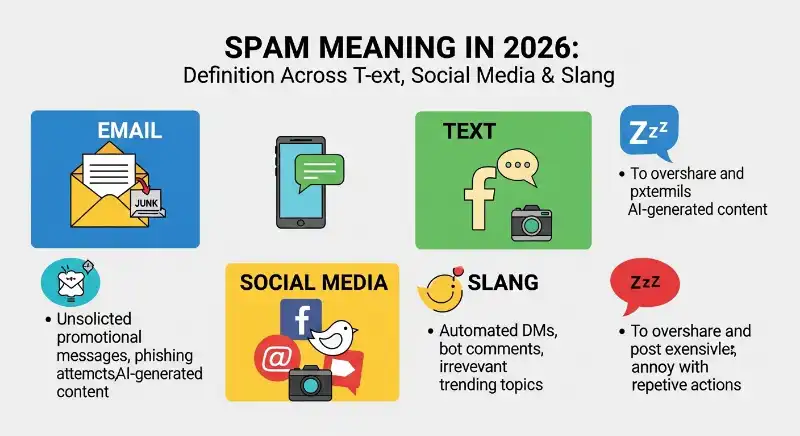
Spam does not exist only in email. The same basic idea can appear across almost every digital communication channel.
What does spam mean in email?
Email spam means unwanted or unsolicited emails, often sent in bulk.
Common examples include:
- Unwanted advertisements
- Fake promotions
- Repeated marketing messages
- Messages from unknown senders
- Suspicious offers
- Phishing emails disguised as legitimate companies
Your email provider may automatically move suspected spam into a Spam or Junk folder.
That filter is useful, but it is not perfect. A legitimate email can sometimes be incorrectly filtered, and a dangerous message can occasionally reach your main inbox.
What does spam mean in a text message or SMS?
Text spam means unwanted SMS or other text messages.
For example, you might receive a message saying:
“Congratulations! You have won a prize. Click this link to claim it.”
If you never entered a contest, the message should immediately make you suspicious.
Text spam can also include unwanted advertising, fake delivery notifications, fake account alerts, and messages designed to get you to call a number or open a link.
What does spam mean on social media?
Social media spam is unwanted or repetitive content posted through social platforms.
It can include:
- Repeated promotional comments
- Fake giveaways
- Automated replies
- Unwanted direct messages
- Accounts promoting suspicious websites
- Repetitive posts designed to attract clicks
For example, if someone comments the same advertisement under dozens of unrelated posts, that is a typical example of social media spam.
What does spam mean in WhatsApp or group chats?
In WhatsApp and other messaging apps, spam usually means unwanted, repetitive, mass, or promotional messages.
Examples include:
- Forwarding the same advertisement to many groups
- Sending repeated promotional links
- Adding people to unwanted groups
- Flooding a conversation with irrelevant messages
- Sending suspicious links to multiple contacts
If someone repeatedly fills a group with unrelated promotional messages, members may reasonably describe it as spamming.
What does “Potential Spam” or “Spam Risk” mean on a phone?
If your phone shows “Potential Spam,” “Spam Risk,” or a similar warning, it generally means the phone or carrier has identified the incoming call as potentially unwanted.
It does not automatically prove that the caller is a criminal or scammer.
The safest response is to avoid sharing personal information until you know who is calling.
If the call is supposedly from your bank, delivery company, government office, or another organization, verify it using an official phone number rather than trusting the incoming caller’s information.
Is It Spam, Phishing, or a Scam? How Do You Tell the Difference?
These words are related, but they do not mean exactly the same thing.
Understanding the difference can help you decide how seriously to treat a suspicious message.
What is the difference between spam and phishing?
Spam describes unwanted communication.
Phishing describes a deceptive attempt to trick you into revealing information, clicking something dangerous, or taking an action that benefits the attacker.
A message can therefore be both spam and phishing.
For example:
“Your bank account will be closed today. Verify your password here.”
If you did not request the message, it may be spam. If it is pretending to be your bank to steal your password, it is also phishing.
The key difference is the purpose.
Spam is mainly about unwanted communication. Phishing involves deception designed to obtain information or manipulate your actions.
What is the difference between spam and a scam?
A scam is a dishonest scheme intended to deceive someone, often for money, information, access, or another benefit.
Spam can be harmless advertising, while a scam is intentionally deceptive.
For example:
Spam:
“Save 20% on our new products.”
Possible scam:
“You have won $50,000. Pay a $500 processing fee to receive your prize.”
The second message is not merely unwanted. It is making a deceptive claim to get money from you.
How can spam turn into phishing or a scam?
Think of spam as the delivery method.
A spammer may send thousands of messages. Most recipients ignore them, but a small number may click.
The message might then:
- Get your attention.
- Create urgency or curiosity.
- Send you to a fake website.
- Ask for personal information.
- Request payment or account access.
- Use the information for further fraud.
This is why you should not assume that every spam message is harmless.
When should you treat spam as a serious security risk?
Take extra care when a message:
- Requests your password.
- Requests a verification code.
- Asks for banking information.
- Demands immediate payment.
- Threatens account closure.
- Contains a suspicious attachment.
- Directs you to an unfamiliar website.
- Pretends to be someone you trust.
- Asks you to bypass normal security procedures.
When a message involves money, passwords, account access, or sensitive information, verify it independently before doing anything.
Why Am I Getting Spam, and How Can You Reduce It?

If you keep receiving spam, you may wonder, “How did they even get my email address or phone number?”
There isn’t always one answer.
How do spammers get my email address or phone number?
Contact information can become exposed in many ways.
For example:
- You may have entered it on a website.
- You may have subscribed to a service.
- A company or service may have experienced a data exposure.
- Your information may have been shared or sold.
- Your address may have been guessed automatically.
- Your phone number may have been obtained through public or online sources.
Sometimes, spammers simply send messages to large lists of possible addresses or numbers.
Receiving spam does not automatically mean that your device has been hacked.
Why do spammers send the same message to thousands of people?
Because spam is usually based on volume.
Imagine sending one advertisement to one person. The chance of getting a response is small.
Now imagine sending it to 100,000 people. Even if only a tiny percentage respond, the sender may still get enough clicks, sales, or victims to make the campaign worthwhile.
This is one reason spam can feel endless.
Why might I suddenly start receiving more spam?
A sudden increase can happen after your contact information becomes available to more senders.
It may also happen because:
- A service you use has shared your contact information.
- Your email or number appeared in a leaked database.
- You recently entered your information on multiple websites.
- Spammers discovered that your address or number is active.
- A spam campaign is temporarily targeting large numbers of people.
A sudden increase is frustrating, but it does not by itself prove that your account was hacked.
Can bots and automated systems send spam?
Yes.
Many spam campaigns use automated systems to send messages, create accounts, post comments, or contact large numbers of people.
That is why spam can appear so quickly and repeatedly.
If a message seems unusually repetitive or arrives from many similar accounts, automation may be involved.
How can you reduce future spam?
You cannot always eliminate spam completely, but you can reduce it.
Try to:
- Use spam filters.
- Report unwanted messages.
- Block persistent senders.
- Avoid posting your email address publicly.
- Be selective about where you enter your phone number.
- Unsubscribe from legitimate marketing you no longer want.
- Avoid interacting with suspicious messages.
The goal is not to make your contact information impossible to find. The goal is to reduce unnecessary exposure and make unwanted messages easier to filter.
What Should You Do When You Receive Spam?
The most important rule is simple:
Do not interact with a suspicious message just because it asks you to.
Instead, pause and verify.
Step 1: Check the sender and message
Look at:
- The sender’s address or number
- The wording
- The reason for contacting you
- Whether you were expecting the message
- Any links or attachments
- Any request for personal information
Don’t let a familiar-looking logo convince you that the message is genuine.
Step 2: Don’t click suspicious links or attachments
A link can take you somewhere completely different from what the message claims.
If you need to visit a website, open it yourself through a trusted method instead of clicking a suspicious link.
The same rule applies to unexpected attachments.
If you were not expecting a file, don’t open it simply to see what it contains.
Step 3: Don’t reply or share personal information
Replying can confirm that your address or number is active.
More importantly, never send passwords, authentication codes, banking details, or other sensitive information simply because a message asks for them.
If an organization genuinely needs information, contact it through an official channel.
Step 4: Block and report the sender
If the message is clearly unwanted or suspicious, use your email provider, phone, or messaging app’s Report Spam or Block feature.
Reporting can help your service identify similar unwanted messages in the future.
Step 5: What should you do if you already clicked a suspicious link?
Don’t panic.
What you should do next depends on what happened.
If you only opened the page and did not enter information or download anything, close it and avoid further interaction.
If you entered a password, change that password through the official website or app. If you entered financial information or believe your account may be compromised, contact the relevant provider or financial institution using an official contact method.
If you downloaded an unexpected file, avoid opening it and consider using your device’s security tools to check the file or system.
The important thing is to act quickly without following additional instructions from the suspicious message.
When is it safe to unsubscribe from an email?
If the email is clearly from a legitimate company you recognize and you previously subscribed to its marketing emails, using its unsubscribe option is generally the appropriate way to stop those messages.
But be more cautious with obviously suspicious emails.
An unexpected message saying “Click here to unsubscribe” may itself contain a malicious link.
When in doubt, use your email provider’s spam controls rather than clicking an unfamiliar unsubscribe link.
Do spam filters really help?
Yes, spam filters can significantly reduce the amount of unwanted mail reaching your main inbox.
They examine characteristics of incoming messages and may automatically move suspicious messages into a spam or junk folder.
But filters are not perfect.
A legitimate message can occasionally be marked as spam, while some unwanted messages can still get through.
That’s why you should still use your own judgment when a message reaches your inbox.
What Else Does “Spam” Mean Outside Digital Messages?
The word spam has meanings beyond unwanted digital messages.
Knowing these meanings can prevent confusion when you see the word in a different context.
What does SPAM mean as a food brand?
SPAM is also the name of a canned meat product made by Hormel Foods.
This is completely different from email or text-message spam.
The food product’s name is commonly written in uppercase as SPAM, while unwanted digital messages are usually written as lowercase spam.
What does “spam” mean in gaming?
In gaming, spamming usually means repeatedly using the same action, attack, message, or tactic.
For example, if a player repeatedly uses the same attack over and over, another player might complain:
“You’re just spamming that move.”
The idea is similar to messaging spam: something is being repeated excessively.
In online communities, “spam” can also describe repeatedly posting the same content or flooding a chat.
Why can the word “spam” have different meanings?
English words often develop additional meanings as people use them in different contexts.
Today, “spam” can refer to:
- Unwanted electronic messages
- Repetitive online activity
- Repeated gaming actions
- A canned food brand
The surrounding context tells you which meaning is intended.
Frequently Asked Questions About Spam
Can a legitimate email be sent to spam by mistake?
Yes. Email filters can sometimes incorrectly classify legitimate messages as spam. If you are expecting an important email, check your spam or junk folder occasionally.
What is a spammer?
A spammer is a person, organization, or automated system that sends unwanted or unsolicited messages, often to many recipients.
Can spam exist without a link or attachment?
Yes. A message does not need to contain a link or attachment to be spam. Unwanted advertising, repetitive messages, or bulk communication can still qualify as spam.
Can blocking one spammer stop all spam?
Not necessarily. Blocking one sender prevents that particular sender from contacting you through that account or number, but other senders may use different addresses, numbers, or accounts.
Does receiving spam mean my phone or computer has been hacked?
No. Simply receiving a spam message does not prove that your device has been hacked. Spam can be sent to large numbers of people without attackers having access to their devices.
What is the safest way to handle a suspicious message?
Pause before interacting with it. Don’t click unexpected links, don’t open suspicious attachments, don’t share sensitive information, and verify important claims through an independent official source. If appropriate, block and report the message.
Key Takeaway: What Does Spam Mean?
Spam means unwanted or unsolicited communication, often sent repeatedly or in bulk.
The most important thing is to understand that spam does not always equal scam. Some spam is simply unwanted advertising, while other messages may be designed to trick you through phishing or fraud.
When you’re unsure about a message, use this simple rule:
Pause → Check → Don’t click → Don’t share sensitive information → Verify independently → Block or report if necessary.
That approach helps you move beyond simply knowing what “spam” means—and helps you make the right decision when spam actually appears on your screen.